




When an online store depends on how the shop actually works
Farmhouse is an artisan butcher with physical shops, in-store pickup, and local delivery. For this kind of assortment, the online store had to align with the daily operations of the shop, rather than function as a standard catalogue store. This includes meat preparation, available pickup points, delivery zones, holidays, and customer communication.
The original WooCommerce store helped validate online sales, but over time plugins, custom changes, and business rules started to overlap in ways that were hard to control. The store was selling, but day-to-day operations required too many checks and manual corrections.
No downtime
Migration of orders, customers, and products4 zones
Local delivery by postal code and delivery rules1 calculation
The same calculation in checkout, admin, and invoicesThis was not a design problem. It started with the order itself.
Before designing the new platform, we had to name where the old store no longer matched the reality of the shop. The main friction was not the homepage. It appeared when an online order became real work for the team.
One platform for the website, the shop, and store management
The project was not just a new look for the online store. Farmhouse now runs on a separate storefront, admin, and API layer where business rules, content, delivery, customer accounts, and orders are managed in one place.
A purchase flow that makes sense from category to cart
Category pages, product detail, and cart use the same language and the same rules. Customers can see what they are ordering, how the product will be prepared, and what can still affect the final amount.
Admin built for real order preparation
The team sees items, preparation options, notes, pickup or delivery method, and order status. The admin is designed for people who physically prepare orders, not just record them.
Rules can be managed without changing the storefront
Products, categories, shops, holidays, notices, VAT rates, and store settings are structured data. They can be changed without touching the visual layer or the purchase flow.
Delivery by postal code and available days
Local delivery works with zones, delivery fees, free-delivery thresholds, and holidays. Customers can see during the purchase whether and how their order can be delivered.
One pricing logic from cart to invoice
Price calculation lives in the API layer. The storefront, admin, and documents therefore do not work from three different interpretations of the same order.
Discounts with clear rules
Coupons can handle validity, minimum order value, usage limits, products, categories, and whether they can be combined with an in-store pickup discount.
Order changes stay traceable
Every order change stores its status, note, and author. The team can later check what happened to the order and why.
Orders and invoices in the customer account
Signed-in customers have a profile, address, order history, and access to invoices. Farmhouse becomes more than a one-off purchase channel for returning customers.
Weight, preparation, and final price in one purchase flow
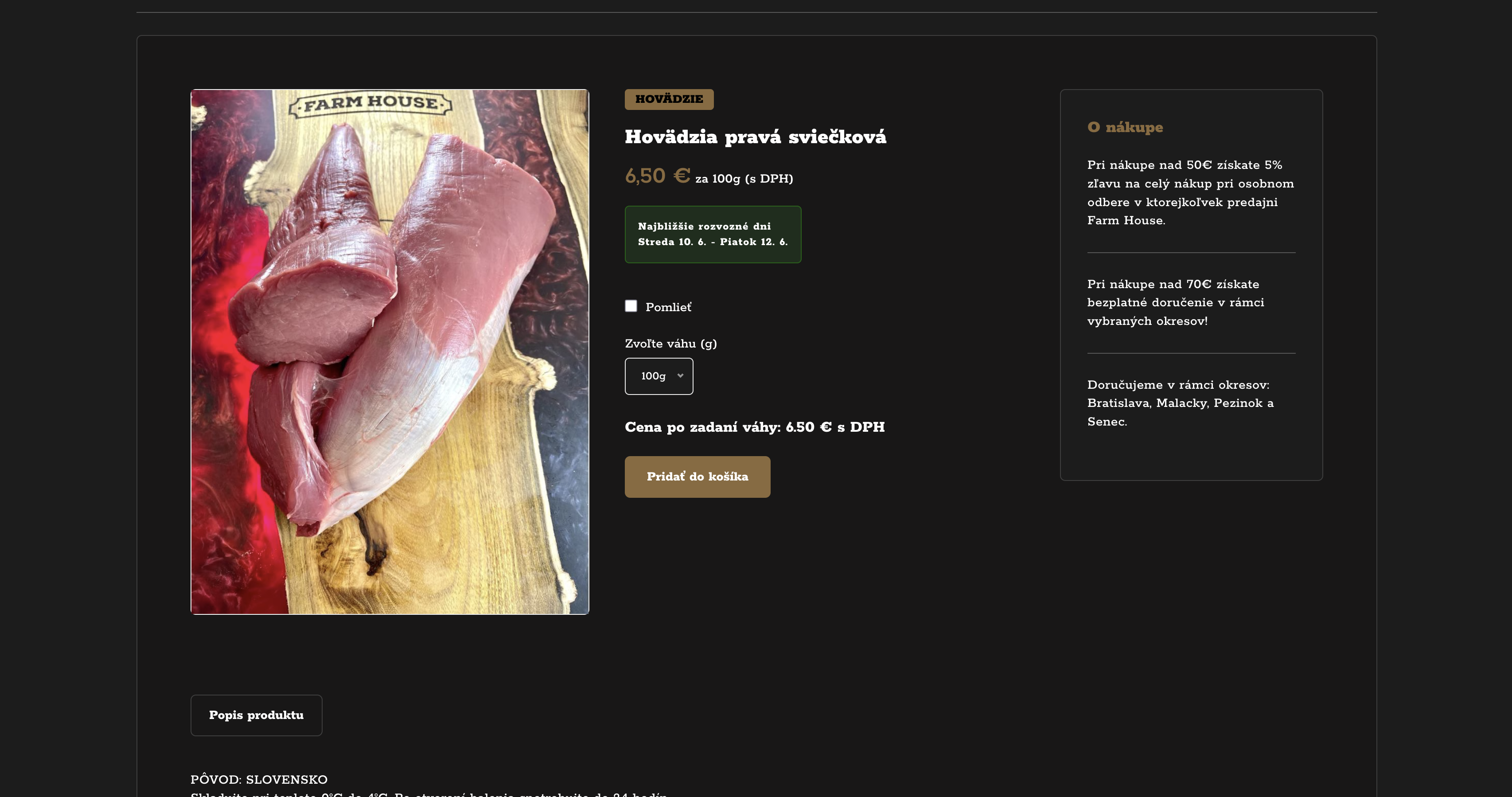
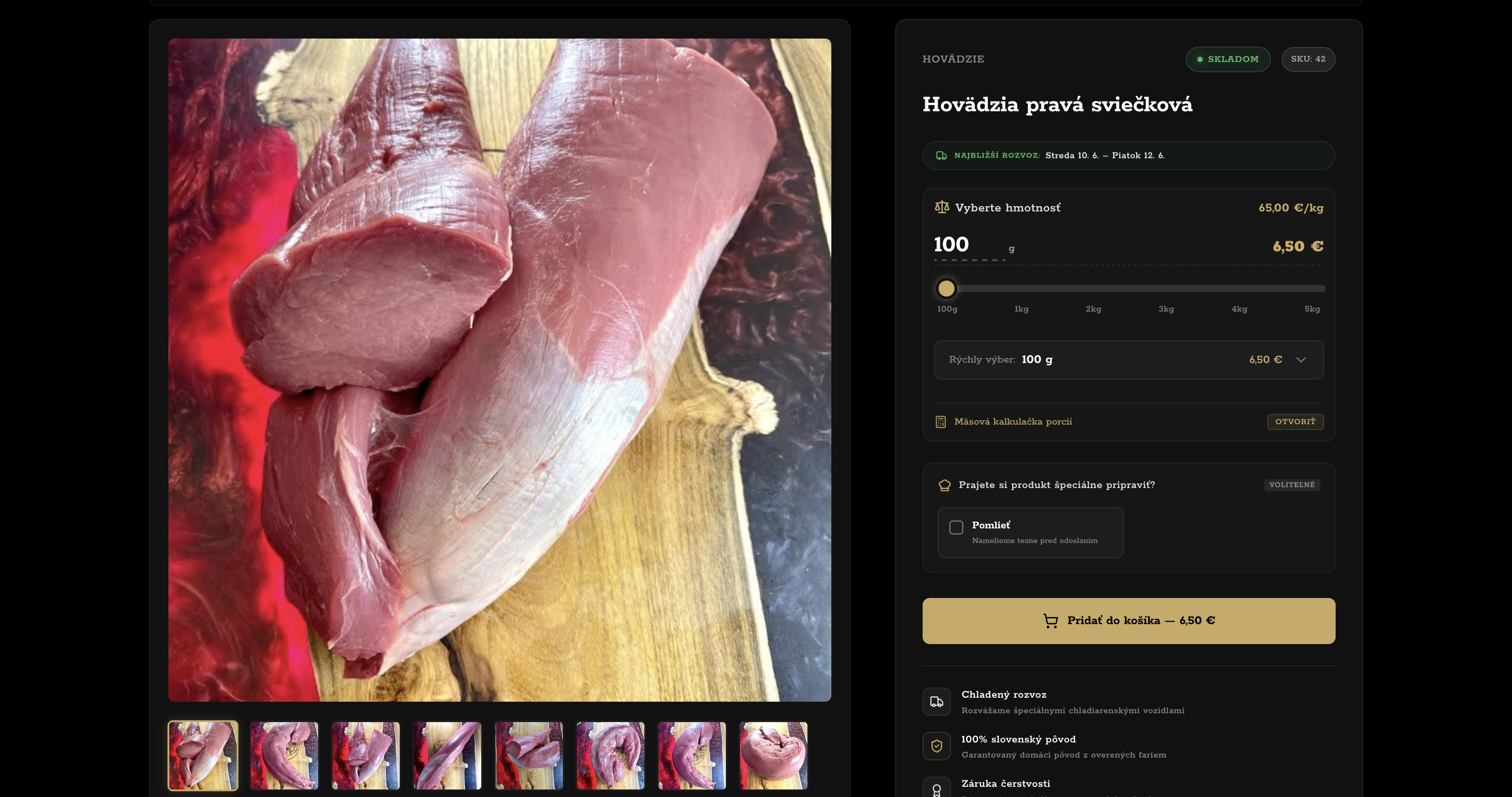
Products sold by weight needed a different purchase step than a standard online store. Customers choose an estimated weight, see the price per 100 g, and understand that the exact amount is confirmed only after the order is prepared.
Weight selection without guesswork
Customers choose from prepared weight options and immediately see the price for the selected weight as well as the price per 100 g. It is also clear that the final amount will be adjusted to the cut that is actually prepared.
- prepared weight options
- price for the selected weight
- price per 100 g
Help with estimating quantity
With meat, customers often care not only about price but also about how much to buy. The helper on the product detail page estimates the recommended weight based on the number of portions.
- portion-based estimate
- less uncertainty while choosing
- more useful product detail
Instructions directly on the product
Customers choose slicing, mincing, or whole-piece preparation for the specific product. During preparation, the shop sees the exact instruction that belongs to each item.
- preparation choice per product
- instructions visible in admin
- fewer follow-up clarifications
A redesign of the whole purchase flow, not just the homepage
For Farmhouse, changing the look of the website was not enough. The important screens were the ones where customers choose a product, review the cart, or complete the order. The specifics of the shop had to be built into the interface, not explained somewhere on the side.
Categories and product listing
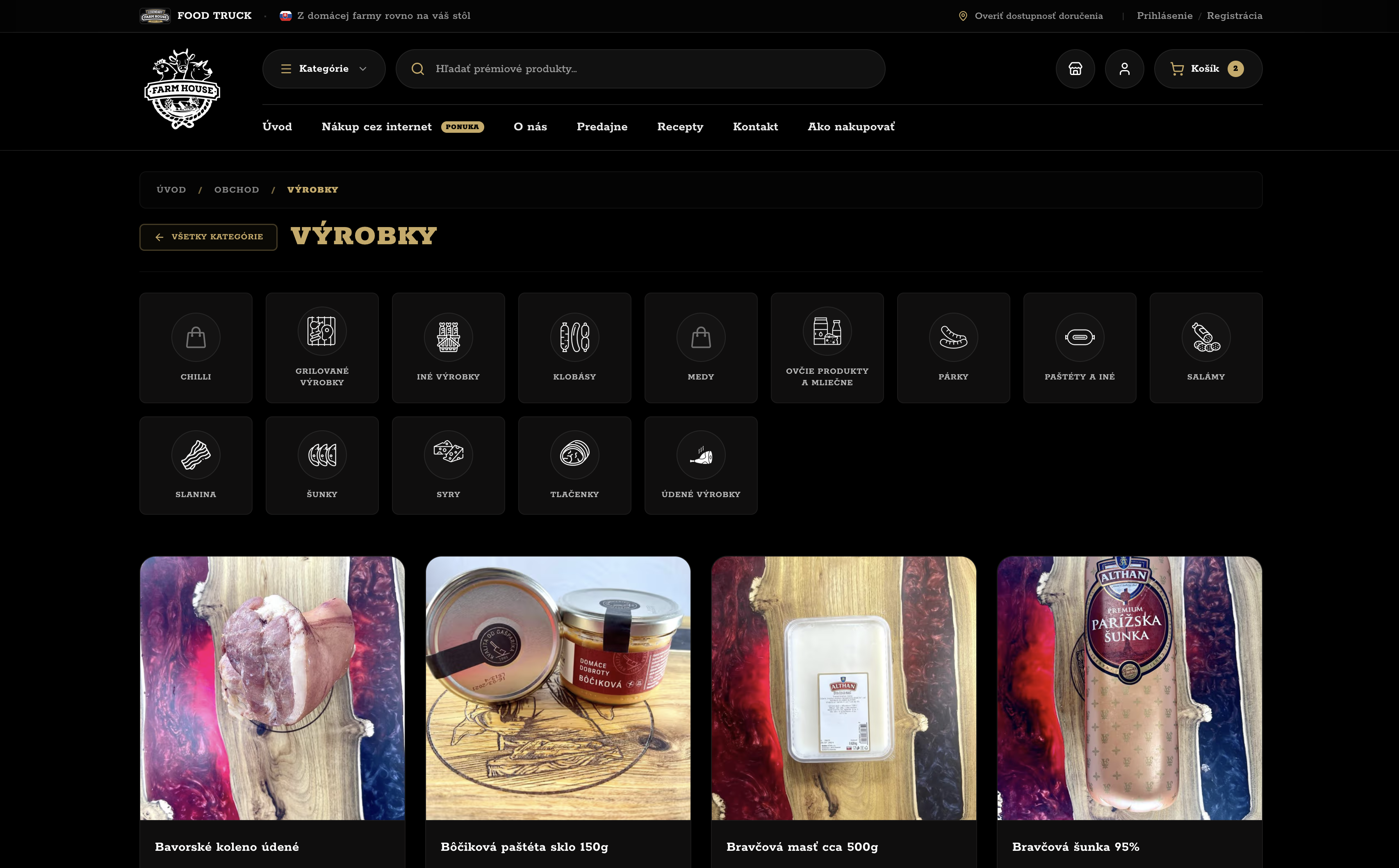
Product cards had to quickly show the assortment, base price, availability, and the difference between a standard product and a product sold by weight.
Categories felt like a generic product list, and the specifics of weight-based products were not clear enough.
The category page separates product types more clearly and helps customers decide before opening the detail page.
Product detail
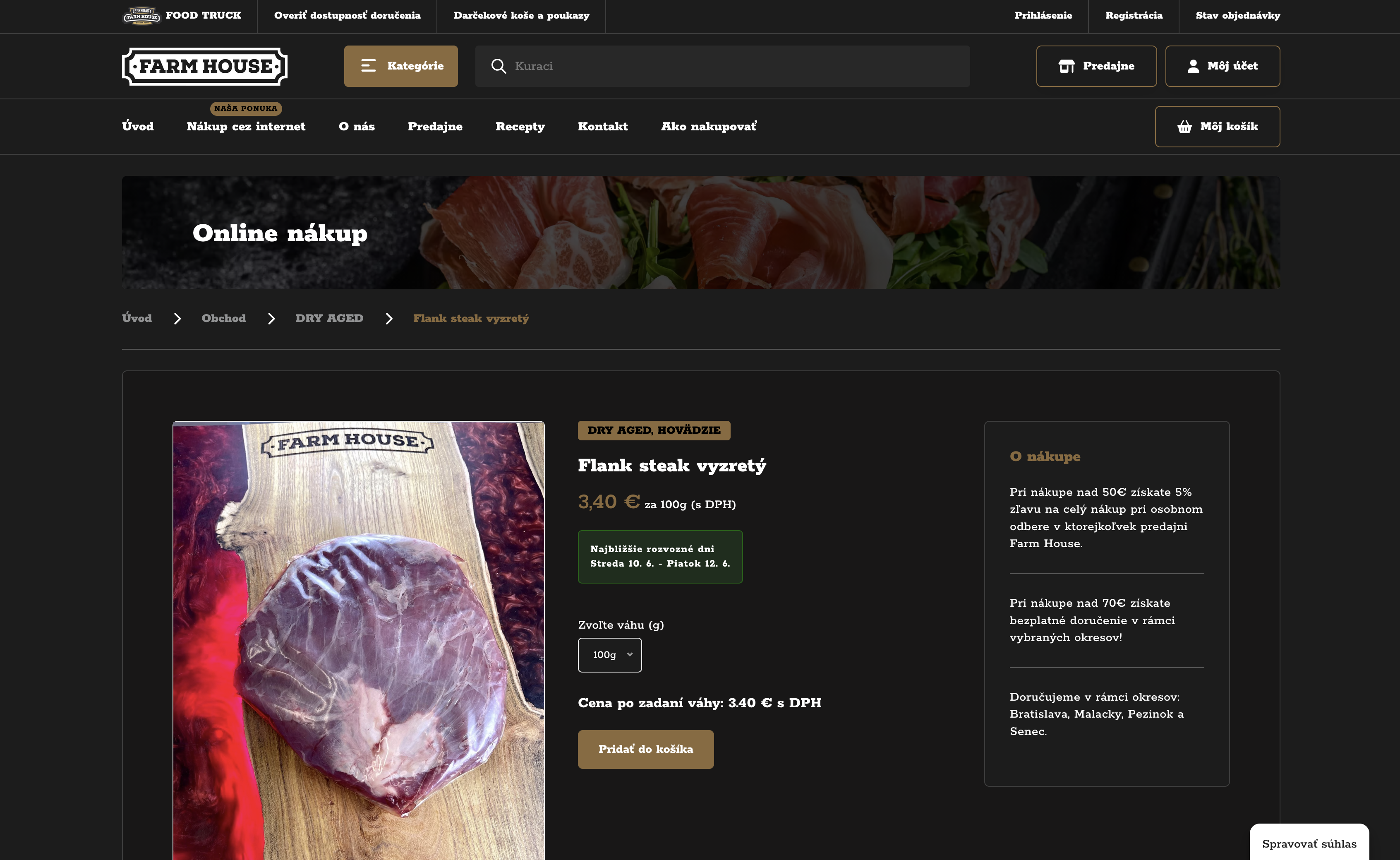
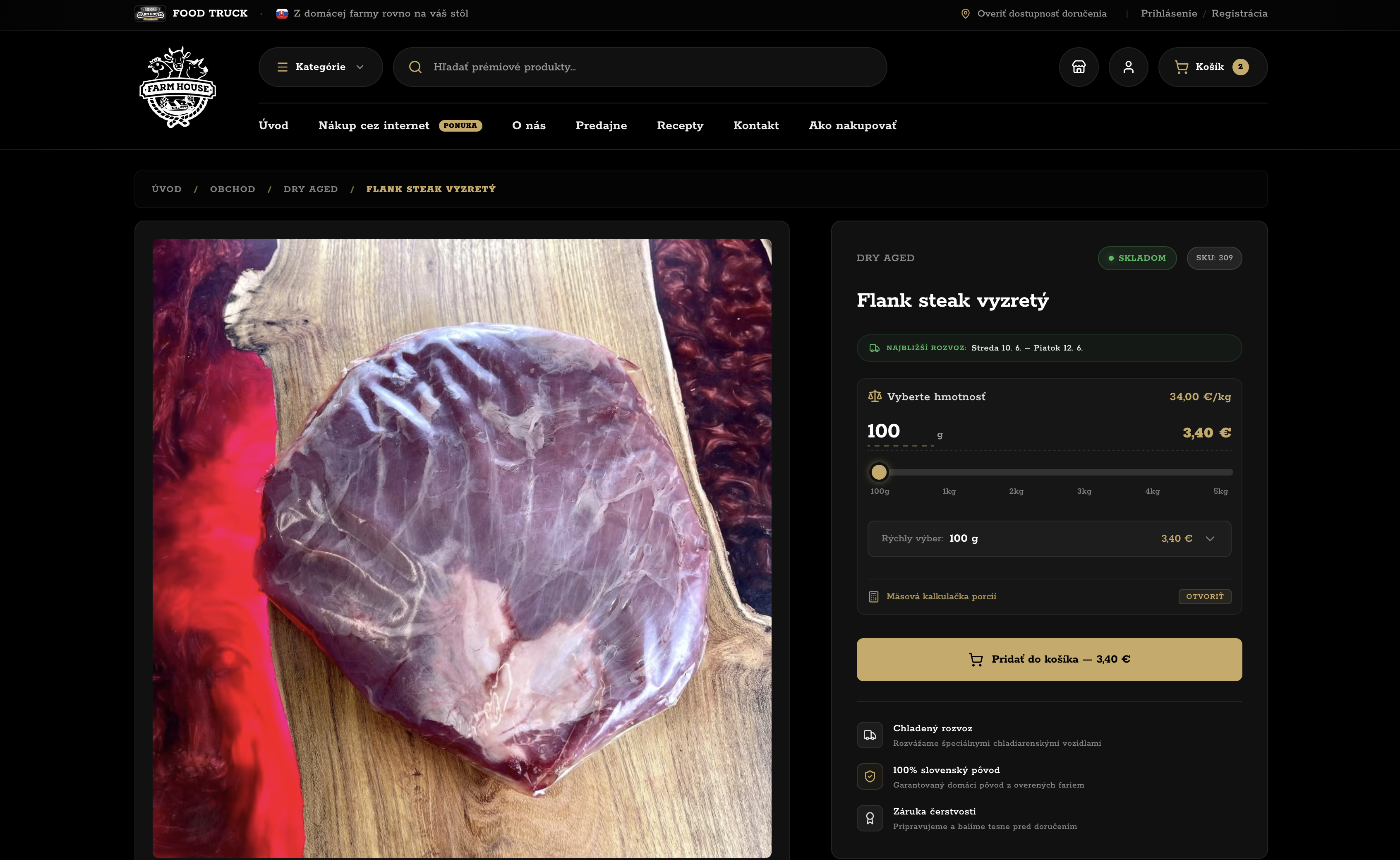
The product detail had to connect the purchase decision with what the shop would actually prepare.
Weight and preparation choices felt like technical WooCommerce product adjustments rather than a natural purchase step.
The new detail gives customers quantity, preparation choices, and practical information in one place.
Cart
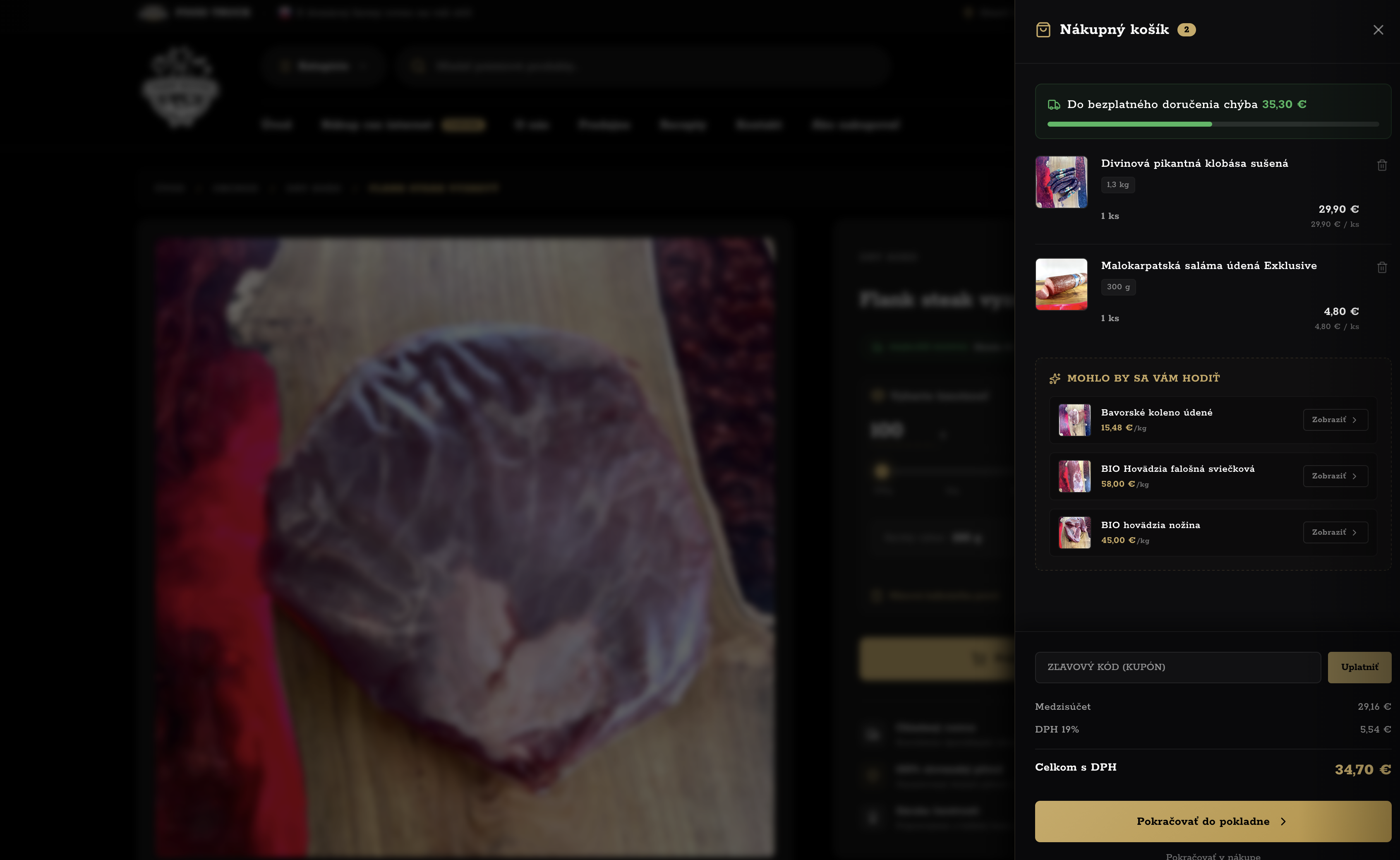
The cart had to bring together items, coupon, pickup or delivery method, and payment on pickup without making the flow feel like a technical exception.
The cart showed the amount like a standard online store, which created the expectation of a fixed price for fresh meat.
The new cart explains the items, payment method, and next step of the order more clearly.
Checkout
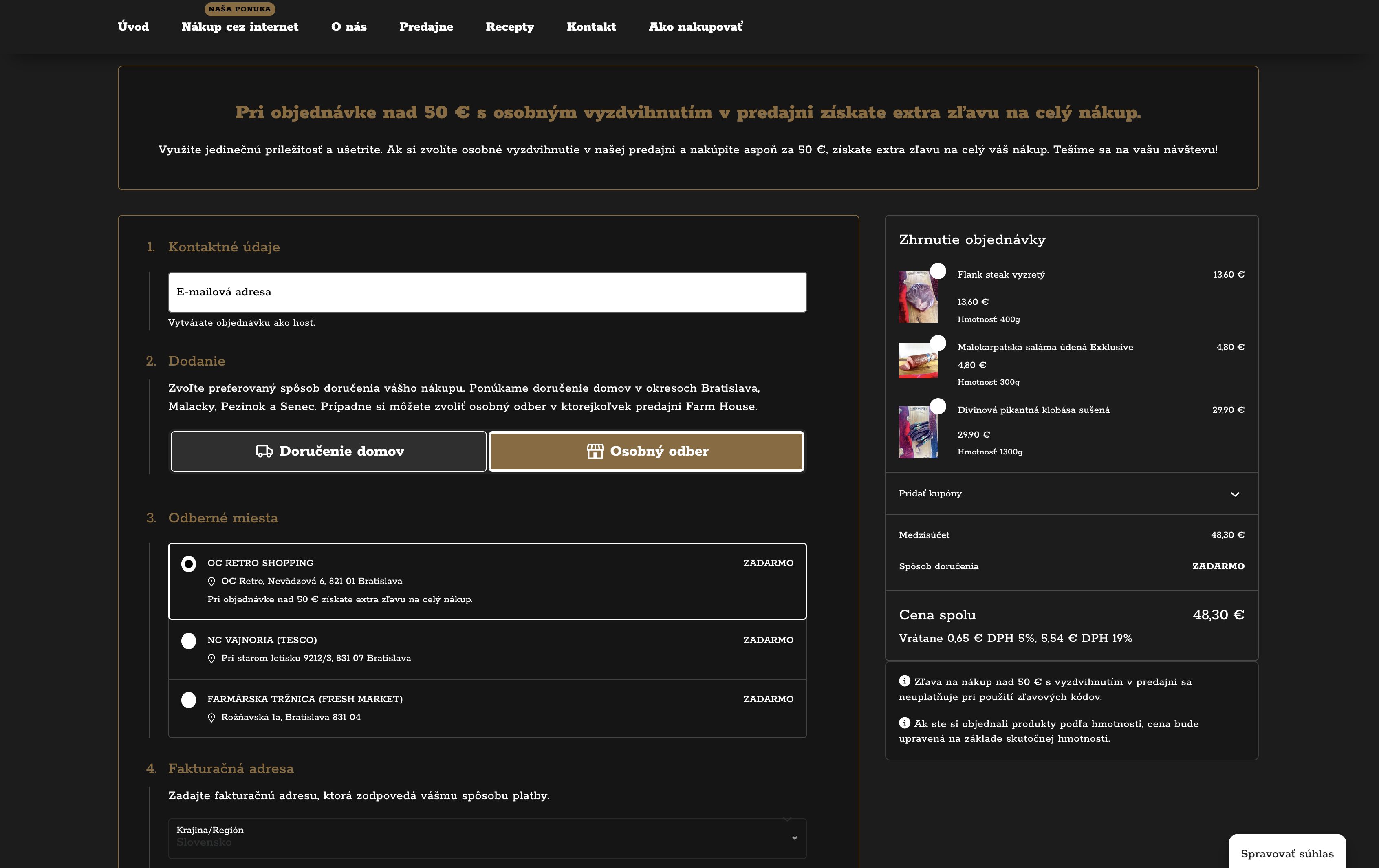
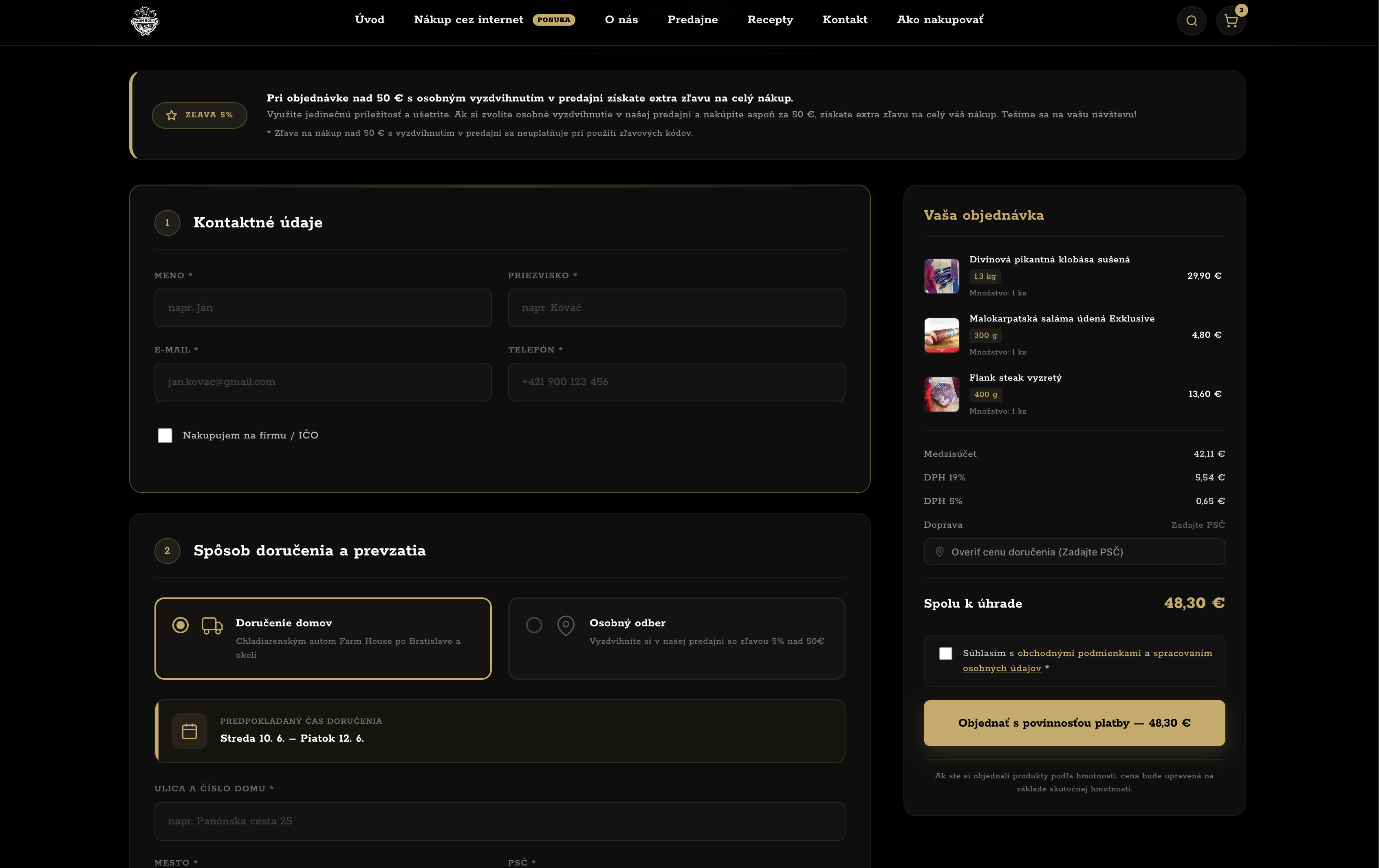
Checkout brings together local delivery, in-store pickup, contact details, delivery rules, and the order summary without requiring customers to understand the shop's internal rules.
Checkout depended on WooCommerce and plugin rules that could not naturally explain local delivery, in-store pickup, and weight-based pricing.
The new checkout guides customers through delivery or pickup, contact details, and order confirmation without unnecessary explanation.
Admin
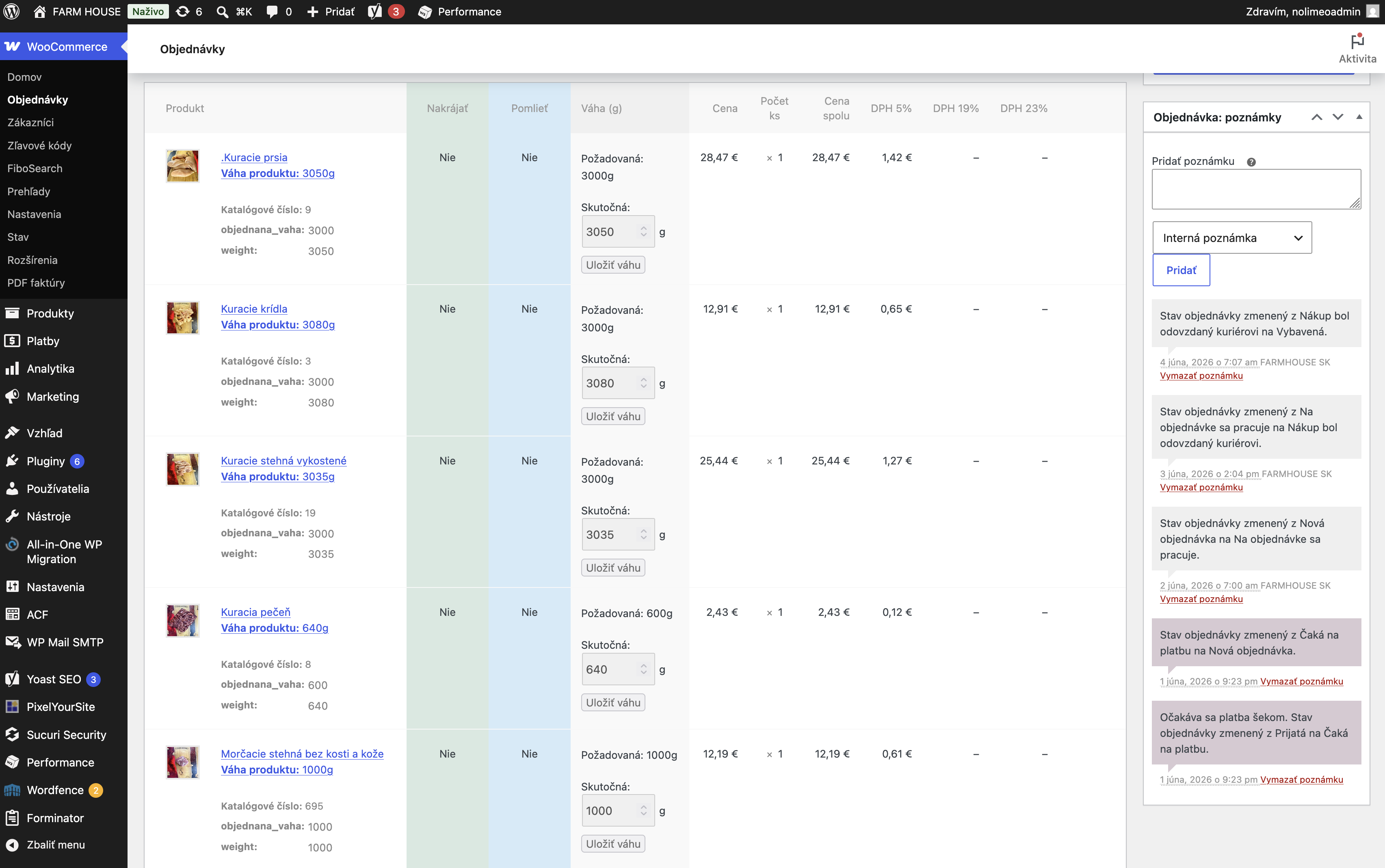
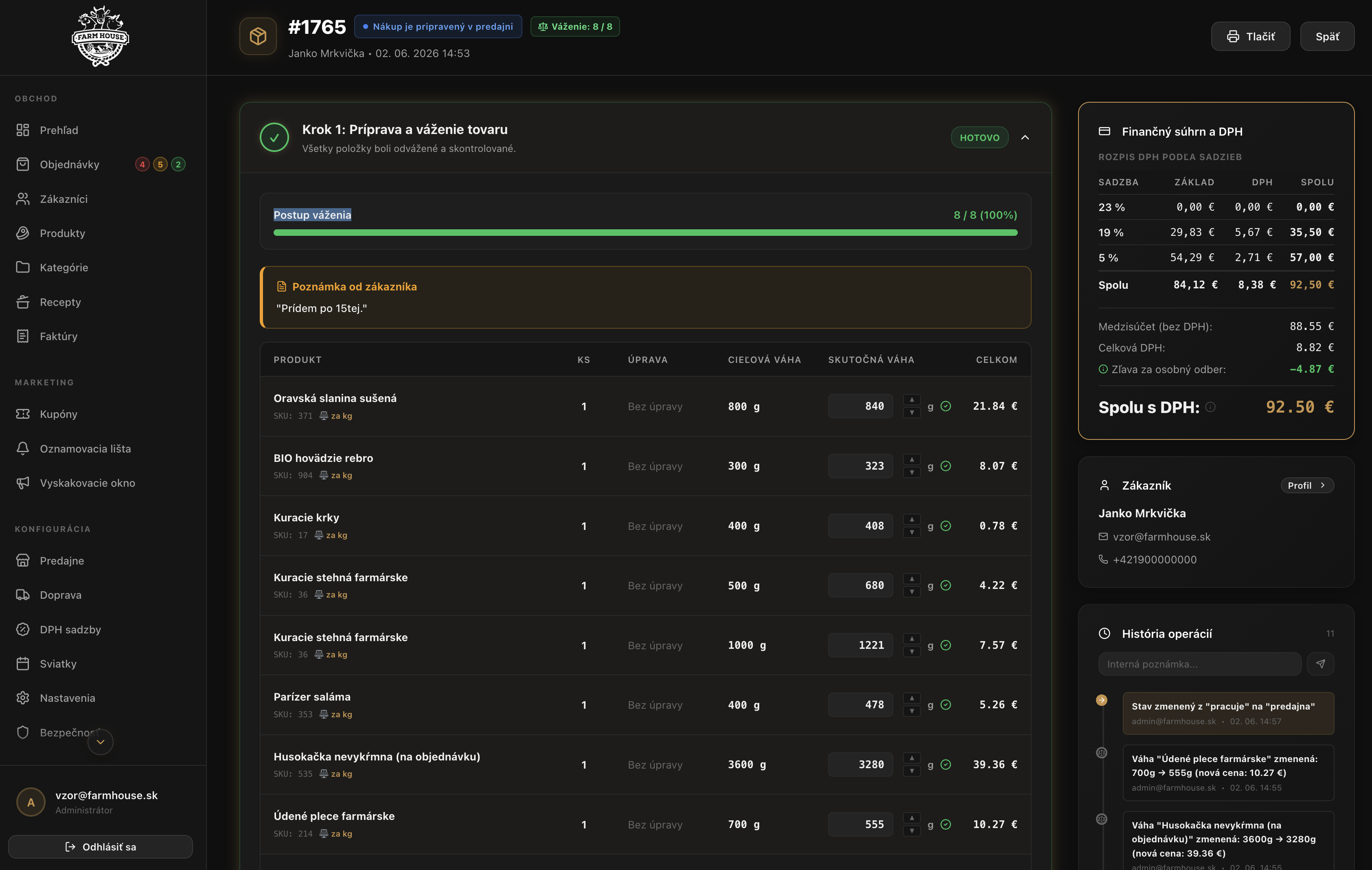
The admin is not just an order table. It is designed for preparation, status checks, documents, and customer communication.
The team worked in an environment built for a generic online store, not for preparing meat by actual weight.
The admin shows the order in the same way the team works with it during preparation and fulfillment.
Moving from WooCommerce without stopping sales
This was not only a redesign. Products, images, customers, order history, weight settings, categories, and delivery rules had to be moved without stopping sales.
Products, settings, and custom fields were stored in a way that worked for WordPress, but was weaker for custom pricing logic, filtering, and data checks.
Products, categories, orders, customers, invoices, shops, and delivery zones each have a defined place. The system can run precise checks and calculations on top of them.
Storefront, admin, and API layer instead of a plugin stack
Farmhouse no longer depends on a fragile mix of plugins on shared hosting. The public storefront, admin, and API layer are separate services that can be deployed in a controlled way, tested, and quickly rolled back if something goes wrong.
Separate services for each part of the system
The API layer, admin, and public storefront run independently. A change in one part does not have to affect the entire purchase flow.
Deployment without downtime
A new version is prepared outside the live application and switched to production only after checks. If something fails, the system can quickly return to the previous stable version.
Security audit in CI
Deployment includes dependency checks, application builds, and type checking. Problems should be caught before they reach customers or the admin team.
Clear separation of responsibilities
The storefront handles shopping, the admin supports the team's work, and the API layer holds the rules for orders, prices, invoices, and communication. Each part has a clear role and does not have to compensate for the rest of the system.
Data ready for future development
Products, customers, orders, delivery, shops, and invoices are stored in a clean database structure. New features can be added on top of data with a clear meaning.
Control over the operation
The system is not tied to a closed rental platform or a random mix of plugins. Farmhouse has its own code, its own data, and a foundation that can keep evolving.
A platform ready for a mobile app
The platform was designed so Farmhouse would not remain tied only to the web. A mobile app can use the same products, cart, customer account, delivery rules, and server-side price calculation without rewriting the business logic.
The same cart and weight-based products
The mobile cart can work with weight, slicing, mincing, and item options. The app can therefore follow the same selling model as the website.
Delivery by postal code
The app is ready for delivery checks by postal code and delivery zone. Customers can check whether delivery is available in their area before placing an order.
In-store pickup and shops
The purchase flow also supports in-store pickup, shop selection, and contact details for pickup. The mobile channel uses the same operational rules as the website.
Customer account and secure sign-in
The app is ready for customer accounts, profiles, and order history. Tokens are stored in secure device storage, not in ordinary local state.
The server calculates the price
The mobile app should not decide the price on its own. Weight, items, discounts, and the final amount are confirmed through the API layer so the website and app use the same pricing logic.
Room for more channels
The separated storefront, admin, and API layer make it possible to add a mobile app without rewriting the core system. The website, app, and admin can work with the same data.
What mattered in the project
Máte ďalšie otázky?
Ak ste nenašli odpoveď na to, čo vás zaujíma, neváhajte nám napísať na [email protected].
[email protected]Farmhouse needed control over its business rules: products sold by weight, item preparation, delivery zones, pickup points, customer accounts, and documents. In the original WooCommerce setup, these parts were assembled from plugins and custom changes.
The admin shows items, preparation method, notes, order status, pickup or delivery, and documents in one place. The team no longer has to piece information together from different parts of the system.
Products, categories, shops, holidays, delivery zones, notices, coupons, and VAT rates are separate from the visual layer of the storefront. Everyday operational changes do not have to mean changing code.
Coupons are not blindly combined with everything else. The system checks coupon validity, usage limits, minimum order value, product and category rules, and compatibility with the in-store pickup discount.
Farmhouse uses transactional emails for order confirmation, status changes, cancellation, credit notes, and customer accounts. Invoices and credit notes are generated from the final order data, not from the current catalogue.
“For Farmhouse, we needed a solution that would not only look good, but also understand how we really work with orders, weight, and meat preparation. Nolimeo understood our processes and turned them into a functional online store.”

Marián Petrík
Managing Director, Farm House store network